
Image: Mozilla
Summary created by Smart Answers AI
In summary:
- PCWorld reports that Mozilla Firefox is introducing comprehensive AI Controls in its browser, allowing users to completely disable or selectively manage AI features.
- This development matters as other major browsers like Chrome and Edge integrate AI extensively without easy opt-out options for users.
- The feature debuts in Firefox Nightly builds and will reach most users within two months, with settings persisting through updates.
Mozilla Firefox has always seemed like the “cool kid” browser option, for the power users who don’t want to deal with Google or Microsoft. So perhaps filling it up with “AI” features — you know, the things people are kind of tired of seeing from Google and Apple — might not be winning people over. Mozilla seems to have read the room: Upcoming builds will let you disable “AI” completely.
“We’ve heard from many who want nothing to do with AI,” says Ajit Varma, Mozilla’s VP of Firefox Product. “We’ve also heard from others who want AI tools that are genuinely useful. Listening to our community, alongside our ongoing commitment to offer choice, led us to build AI controls.”
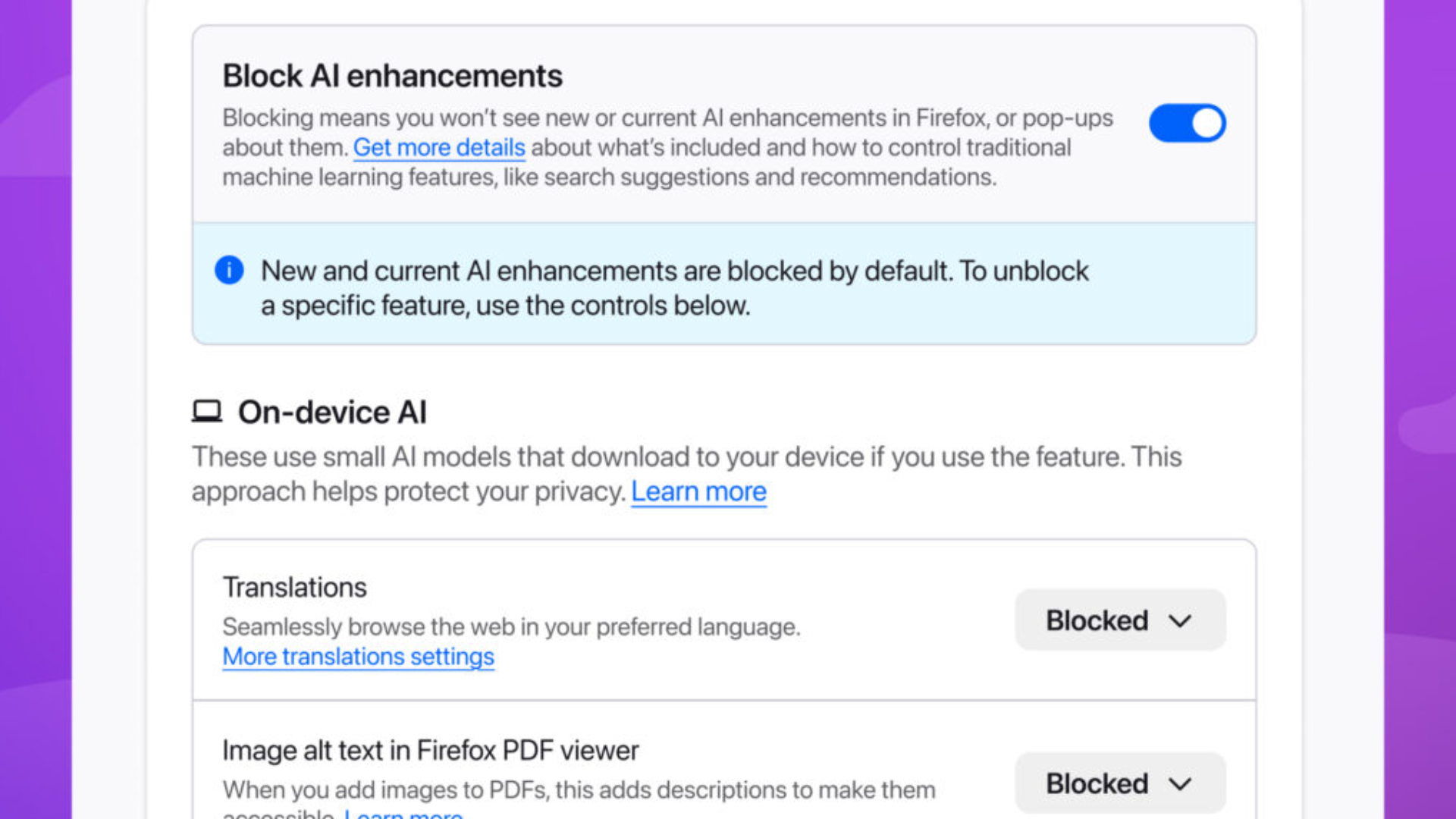
The new AI Controls option just debuted in Firefox Nightly builds, which means it’ll be coming to most users within a month or two. Right at the top of the menu is a big toggle for “Block AI enhancements,” which will turn it all off — even pop-up info about new features. Users will get to enable or block other “AI” tools selectively, including translation, automatic alt text in PDF files, tab group suggestions, and link previews. And these choices will remain persistent through updates, at least according to Mozilla. It’s an admirable amount of user control, especially for a browser that’s so heavily invested in user customization.
Other major browsers, including Chrome and Edge (both based on Google’s Chromium), have been adding “AI” features so fast that it’s hard to keep up with the sheer volume. Edge has a huge Copilot button right next to your profile, in case you missed the one on your keyboard. Shades of Internet Explorer, which Firefox helped to kill decades ago, are unavoidable.
Microsoft should take a hard look at what people actually want, just like they’re doing with Windows. Chrome has a giant “AI MODE” search button in roughly the same place, and soon it’s going to automatically browse for you, mirroring the proposal from other “AI” browsers like Perplexity Comet and Opera Neon.
Nothing is cracking Chrome’s dominance in the browser space anytime soon — that’s why they call it a monopoly. But alternatives have noticed the discontent among the digital peasants. Mozilla’s whole schtick is offering a realistic, open-source alternative; for example, it’s the go-to browser if you still want the “real” uBlock Origin ad-blocking extension. I’ll also shout out my browser bestie Vivaldi (drink), which has a very clear and succinct approach to the rise of “agentic AI” browsers.

Vivaldi
A clear, easy-to-find toggle for “AI” is something I’ve asked for more or less by name, so I’m glad that Mozilla can see the demand for it. Now if only someone up in Redmond would open up their eyes…
Author: Michael Crider, Staff Writer, PCWorld

Michael is a 10-year veteran of technology journalism, covering everything from Apple to ZTE. On PCWorld he’s the resident keyboard nut, always using a new one for a review and building a new mechanical board or expanding his desktop “battlestation” in his off hours. Michael’s previous bylines include Android Police, Digital Trends, Wired, Lifehacker, and How-To Geek, and he’s covered events like CES and Mobile World Congress live. Michael lives in Pennsylvania where he’s always looking forward to his next kayaking trip.